FAQ
I installed the app, but nothing is showing up.
In some corporate or highly restricted network environments, firewall settings may block access to the servers used by our app.
If that happens, try opening the app from a different network, such as mobile data or your home network, and check whether it loads correctly.
If it works on another network, please ask your network administrator to allow access to our servers in your firewall settings.
Does this support the legacy account page?
The legacy my account page is not supported. The features of this app are only available with new accounts.
Does the app support multiple languages?
Yes. In addition to your store's primary language, the app supports English, Japanese, Spanish, German, French, Portuguese, Italian, Dutch, Arabic, Vietnamese, Polish, Simplified Chinese, Traditional Chinese, Korean, Malay, Thai, and Indonesian. If you need support for another language, please contact us.
The Block Form I inserted does not appear on the Thank you page or Order status page.
It is possible that the upgrade for the Thank you page and Order status page has not been completed yet.
Please go to:
Settings > Checkout > Upgrade Thank You and Order Status Pages > Review Customizations > Upgrade
and complete the upgrade.
Metafield data is not saving.
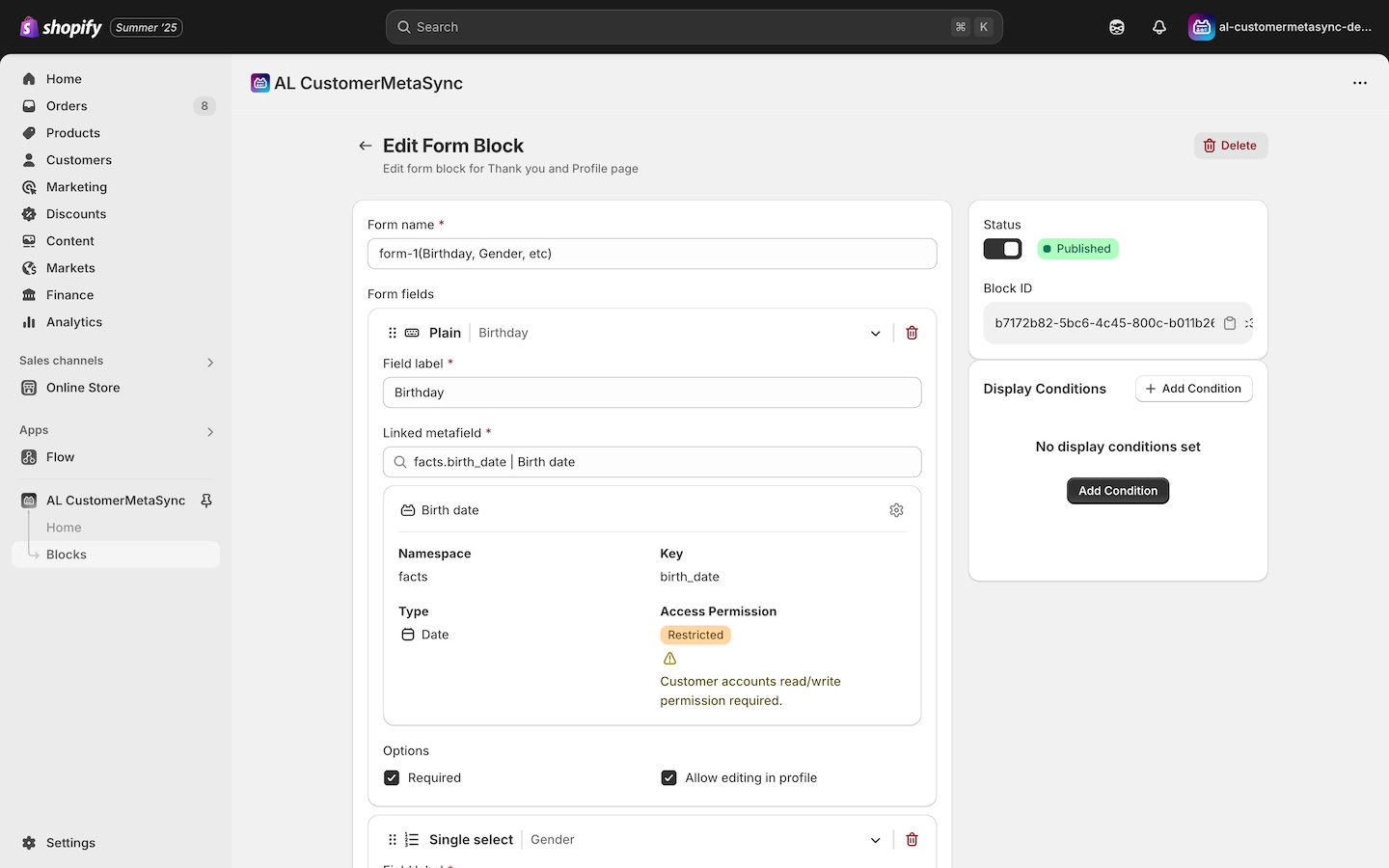
In Shopify, Customer Account API access for metafields can be set to No access, Read, or Read and write.
If metafield data is not saving correctly, make sure the permission is set to Read and write.
If the permission is not set correctly, the app will show a warning message like the one below.
Does the app support the legacy Thank you page?
No. The legacy Thank you page is not supported. You need to upgrade your Thank you page before using this feature.
The deadline for upgrading the Thank you page and Order status page is August 28, 2025 for Shopify Plus stores, and August 26, 2026 for all other plans.
If your store has not completed the upgrade yet, we recommend taking care of it as soon as possible. If you are unsure how to upgrade or how to migrate your current customizations, please consult a Shopify Partner such as our team.
Can I prevent customers from editing data such as their birthday after they submit it?
Yes. Uncheck Allow editing in profile in Blocks > Form Blocks > Edit > Profile page.
If the customer does not have birthday data yet, select Allow editing in profile > Allow editing only once if empty. This lets the customer enter the value once, but prevents further changes after that.
I entered the correct Block ID in the Customization screen for the Profile, Thank you, and Order status pages, but the form still does not appear.
Have you configured visibility conditions for the form based on customer tags or metafields? If so, the Customization screen may not behave as expected because it uses dummy data. Please test while logged in on the live storefront or preview, rather than relying on the Customization screen.
I entered metafield data from the Profile, Thank you, or Order status page in the Customization screen, but the changes are not reflected. Is this a bug?
No. The Profile, Thank you, and Order status pages opened from the Customization screen are demo views and cannot update real customer data. Please test from the storefront preview while logged in.
How can I test a form inserted on the Thank you page?
Please place a test order to verify the form.
If you want to reload the same Thank you page multiple times during testing, please also refer to the next FAQ item.
When I reload the Thank you page during testing, it redirects to the Order status page. Can I stop that redirect?
Yes. Add ?prevent_order_redirect=true to the end of the /thank-you URL and reload the page. This lets you stay on the Thank you page while testing.
For more details, see:
Can I insert images or social media icons on the Thank you page?
This is not supported at the moment, but we may add it in a future update.
Can customers update profile information other than metafields?
Yes. We provide a UI extension that lets customers update their email and SMS marketing preferences from the Profile page.
For SMS marketing, the option appears only if the customer already has an SMS phone number on file.
For details, see:
Email & SMS Marketing Preference UI Extension
Can the onboarding form also be shown after login through Shop, Google, Facebook, or SSO?
Yes.
We also have implementation experience with authentication platforms such as CRM Plus on LINE and Store CRM.
I set up the onboarding form, but it does not appear.
Customers who have already submitted the onboarding form on their first login will not see it again. If the onboarding form does not appear after one-time passcode, Shop, Google, or Facebook authentication even though App embeds is enabled, you may need to update the login link manually.
For details, see Step 4: Enable App embeds in the Theme Editor in the onboarding form setup guide, or check the next FAQ item.
I enabled the onboarding form and turned on App embeds in the theme editor, but customers still are not redirected to the onboarding form after login. Why?
The AL CustomerMetaSync app embed rewrites login links only when it detects specific patterns, such as certain paths, in the theme's login-related code. If your theme does not match those patterns, the app embed will not run as expected.
Check the login URL from the theme preview page or another testing mode. If the app embed is working correctly, the URL should include &return_to=%2Fapps%2Fal-customermetasync%2Fonboarding.
Below is one example of how you can update the code. A sample AI prompt is also included.
Example:
Note: You can switch between the before and after examples.
- Before
- After
{% if customer %}
  <a class="header-account-link" href="{{ routes.account_url }}" aria-label="{{ 'layout.customer.account' | t | escape }}">
    <span class="header-account-link__text desktop-only{% if section.settings.icon_strategy == 'icons_only' %} visually-hidden{% endif %}">{{ 'layout.customer.account' | t | escape }}</span>
    <span class="header-account-link__icon{% if section.settings.icon_strategy == 'icons_cart_search' %} mobile-only{% endif %}">{% render 'svg-user' %}</span>
  </a>
{% else %}
  <a class="header-account-link" href="{{ routes.account_login_url }}" aria-label="{{ 'layout.customer.account' | t | escape }}">
    <span class="header-account-link__text desktop-only{% if section.settings.icon_strategy == 'icons_only' %} visually-hidden{% endif %}">{{ 'layout.customer.account' | t | escape }}</span>
    <span class="header-account-link__icon{% if section.settings.icon_strategy == 'icons_cart_search' %} mobile-only{% endif %}">{% render 'svg-user' %}</span>
  </a>
{% endif %}
{% if customer %}
  <a class="header-account-link" href="{{ routes.account_url }}" aria-label="{{ 'layout.customer.account' | t | escape }}">
    <span class="header-account-link__text desktop-only{% if section.settings.icon_strategy == 'icons_only' %} visually-hidden{% endif %}">{{ 'layout.customer.account' | t | escape }}</span>
    <span class="header-account-link__icon{% if section.settings.icon_strategy == 'icons_cart_search' %} mobile-only{% endif %}">{% render 'svg-user' %}</span>
  </a>
{% else %}
  {%- capture onboarding_return_to -%}/apps/al-customermetasync/onboarding?locale={{ localization.language.iso_code }}{%- endcapture -%}

  <a class="header-account-link" href="/customer_authentication/login?return_to={{ onboarding_return_to | url_encode }}" aria-label="{{ 'layout.customer.account' | t | escape }}">
    <span class="header-account-link__text desktop-only{% if section.settings.icon_strategy == 'icons_only' %} visually-hidden{% endif %}">{{ 'layout.customer.account' | t | escape }}</span>
    <span class="header-account-link__icon{% if section.settings.icon_strategy == 'icons_cart_search' %} mobile-only{% endif %}">{% render 'svg-user' %}</span>
  </a>
{% endif %}
Sample prompt
Copy the login-related code and ask AI with a prompt like this:
I want to change the destination of the link when the customer is not logged in so that it points to the app proxy provided by AL CustomerMetaSync.
<a href="/customer_authentication/login?locale={{ localization.language.iso_code }}&return_to={{ "/apps/al-customermetasync/onboarding" | url_encode }}">
When the customer is already logged in, it should navigate to the order history or profile page.
Please output the code updated according to these rules.
Can I customize the onboarding form design or add custom validation?
Yes.
The onboarding form can load custom CSS and custom JS files placed in your theme's assets directory. Use this when you want to adjust the UI or add custom validation.
Can I require customers to submit the onboarding form before they can continue shopping?
Not through the app settings alone. To enforce this, you need to add custom logic to your theme code.
When a customer submits the onboarding form, AL CustomerMetaSync creates the following boolean metafield:
al_customermetasync.has_onboarding_completed
This value corresponds to Has Onboarding Completed.
The onboarding form is shown when this value is blank or false.
Once the form is submitted and the value becomes true, the form will not appear again on later visits.
However, there is one exception.
If a customer already has values for every field included in the onboarding form, the form is skipped even when has_onboarding_completed is blank or false.
In that case, because the form is never submitted, has_onboarding_completed is not updated to true.
For that reason, if you want to enforce a rule like "customers must submit the onboarding form before they can shop," you need extra logic in the theme.
For example, in theme.liquid or a similar file, you could add logic like this:
Redirect eligible customers to /apps/al-customermetasync/onboarding when Has Onboarding Completed is blank or false, while excluding customers who already have all onboarding form fields filled in.
With that kind of implementation, you can make onboarding form submission mandatory for the relevant customers.
Are there any Shopify Flow triggers or actions?
We provide Shopify Flow triggers that run after a form is submitted or updated on the Profile, Thank you, and Order status pages. For example, you can use Flow to send birthday data collected from a form submission to an external service.
For details, see:
I want customers to enter birthdays as separate year, month, and day fields instead of a single Date field.
If you split the date into separate fields, frontend validation becomes more difficult because users may enter invalid dates such as February 31. For that reason, we recommend using a Date field.
If you still want to store the data separately for marketing purposes, use a Shopify Flow trigger to split the birthday entered as a Date field and save it into the target metafields.
Can I configure display conditions for forms?
Yes.
Currently, in addition to the onboarding form, forms on the Profile, Thank you, and Order status pages can be shown or hidden based on customer tags or metafield values. Because the onboarding form appears early in the customer journey, you can use the first response as a starting point and then collect additional information or updates through later touchpoints. On the Thank you and Order status pages, display conditions can also be based on the products included in the order. We are considering additional condition types in future updates.
For details, see: